Reclaim your Google Business Listing
July 28, 2026
How to make your Google Business Listing come up as "official site" on search and map searches
Is there anything more frustrating that seeing another competitor or OTA's website linked right under your Google Business Listing?
One of the first things we do when we send your activities to the Google Things To Do (GTTD) Feed is make sure that your website is listed as the official website. That's essentially sending 30-40% more direct revenue to your business.
We see it all the time, take our client at Orlando Bike Tours. They have been around for a little while and they have a great understanding about how to get infront of thier clients.
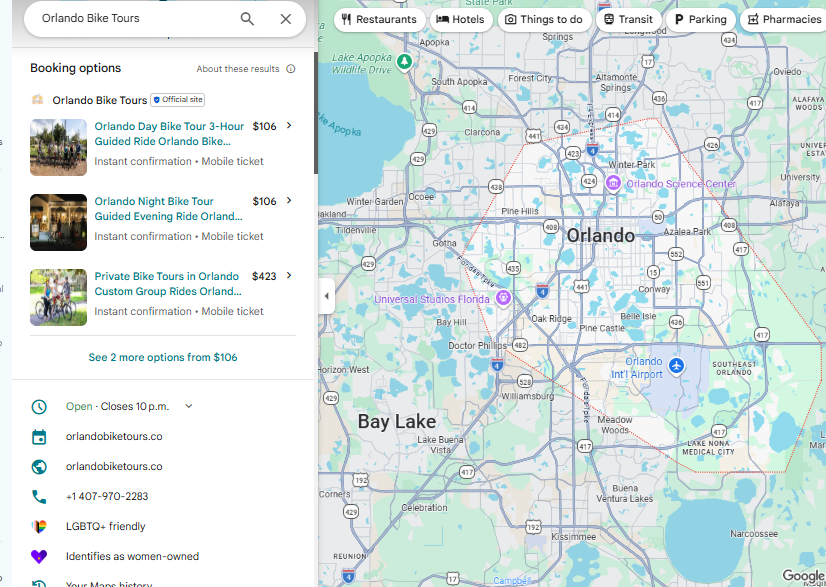
Here you can see that under their Google Business Profile the booking was being pointed to "Experiences"
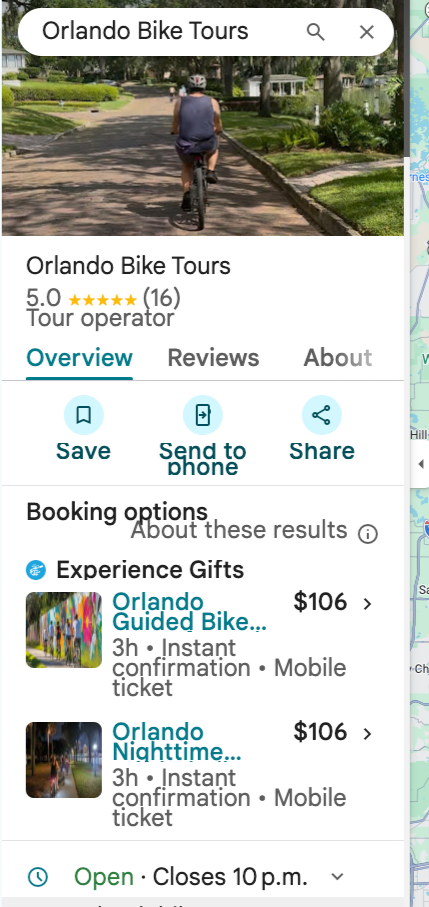
After we uploaded their activities to the GTTD feed, the link is now directed to their own booking platform. That can represent an significant increase in traffic and revenue!
We are currently offering all tourprenuer members a free. no commitment 2 month trial with code FREE2TOUR, happy to answer any questions you might have
How to get your tours listed on Google Things to Do: the step-by-step
That Orlando Bike Tours switch is the end of a process, not a single toggle. Here is the whole sequence, in the order it has to happen.
Step 1 — Verify your Google Business Profile
Nothing downstream works without it. Claim the profile, verify by postcard, phone, or video, and complete every field: name, primary category, service area, hours, phone, and a website URL that points at a real booking page.
Pick the most specific primary category you can. "Boat Tour Agency" puts you in different searches than "Travel Agency", and the difference is measured in bookings. The setup and verification guide covers the awkward cases, including profiles someone else already claimed.
Step 2 — Check that you are eligible
Google has a defined list. Tours, sightseeing, attractions and museums, classes and workshops, tastings and food experiences, and recreational rentals are eligible. Airport transfers and car services, movie tickets, one-off concerts and festivals, overnight stays and multi-day cruises, and virtual-only experiences are not.
Alcohol tastings, axe throwing, archery, laser tag, and paintball are allowed where legally permitted, even though standard ads policy is stricter. Recurring venue-based activities — residencies, exhibits, seasonal markets, haunted houses — are allowed, but must be removed from the feed once they end.
Step 3 — Get your booking page in order
Google reviews the page your listing points at. It has to show the same product, the same total price including fees, and let a traveller book without hunting for it. The landing page criteria lists what gets checked, and the landing page guidelines show acceptable layouts alongside the ones that get rejected.
Step 4 — Choose how your inventory gets to Google
Two routes. Google's own Tickets and Activities editor, inside your Business Profile, lets you add activities by hand — fine for a few products and quick to go live. Or a connectivity partner submits a feed on your behalf, which keeps pricing and availability synced automatically and supports the Official Site badge.
You can start with the editor and switch later; a partner feed replaces the manual listings automatically. Our post on what a Google connectivity partner is explains why Google steers operators with fewer than 100 properties toward the partner route.
Step 5 — Clean up titles and images before submitting
Two things account for most rejections. Titles written as marketing copy instead of product names — the title guidelines show the expected format. And images that are cropped badly, watermarked, or too low resolution — the image guidelines cover sizes and crops.
Step 6 — Get the pricing right, and keep it right
Your listed price is the total an adult pays, including all fees and taxes, matching what your website charges. Standard adult ticket, no child pricing. Any currency. Variable pricing means one representative price; minimum group sizes mean the cost for one person to book.
Google checks this against your site. A mismatch pulls the listing until it is corrected and resubmitted.
Step 7 — Layer ads on once you are live
With inventory in the feed you become eligible for Google Things to Do Ads, which place your listing above the OTAs on a cost-per-click basis rather than a commission.
How long it takes
Verification is usually the slowest part — days to a couple of weeks depending on the method. Feed setup and review is typically days once your pages are compliant. Most operators who arrive with a verified profile and a working checkout are live inside a week.
Doing it yourself, or not
All of the above is documented in the free Get Found Online course, lesson by lesson, with a beginner and an advanced track. Nothing is gated.
If you would rather hand over the feed, compliance, and monitoring, that is what we do for $25 a month with no commission, and signing up is free. See how it works or the pricing page for the detail. And for the wider context on where this channel sits against the OTAs, read where to list your tours.
Related reading: why Google Things to Do matters for operators and how to optimize your Google Business Profile for more bookings.
Want this kind of strategy applied to your tours?
Setup gets your Official Site badge live on Google Things to Do. Organic Official Site listing always included.
Related GTTD Ads questions
- How is GTTD CPC different from regular Google Ads?
- What does "Organic Official Site listing included" mean?
- How long until my Official Site badge is live on Google?
- How much does GTTD CPC actually cost per click?