Image & photography guidelines
The quality of your photos is one of the most important levers for Google Things to Do. Images are used in both the GTTD experience module and Things to Do Ads — here's what makes a good vs bad photo, and how to avoid the common mistakes that quietly hurt performance.
Source: Google Actions Center — Image guidelines
Format requirements
product/use_media_order = true. Google treats this as a hint, not a guarantee.How to update an activity image
If you already have an activity live on Google Things to Do, you can swap in a better photo without rebuilding the whole feed. Open the activity editor, scroll to the Media URLs section, and add or replace the image URL. Remember: the new URL must meet the image quality guidelines above so Google accepts it and shows it in search results.
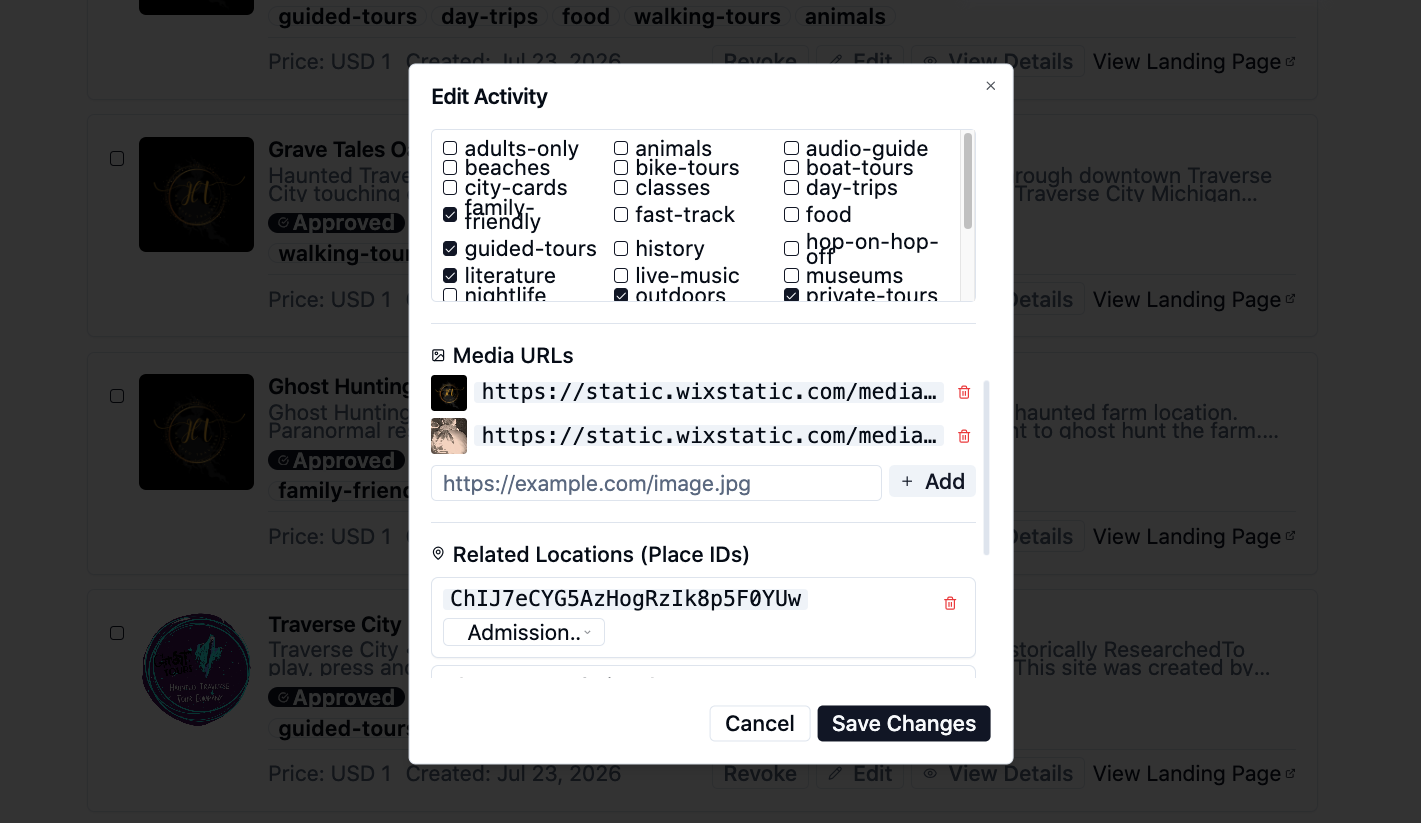
Example: the Media URLs field inside an activity editor. Add a new URL, then remove or reorder old images, and press Save Changes.
- 1Click Edit on the activity you want to update.
- 2Find the Media URLs section in the modal.
- 3Paste the URL of a new image that meets the Google Things to Do image quality standards (resolution, aspect ratio, no overlays, authentic content).
- 4Click + Add, remove any outdated URLs, and then press Save Changes.
- 5Google will recrawl the activity; the updated image usually appears in Things to Do within a few days.
Pro tip
When replacing an image, use a new URL rather than overwriting the old file. Google treats a changed URL as a fresh asset and recrawls it faster.
Quality best practices
Following a few photography fundamentals turns average photos into great ones. Each block below is a Do / Don't pair based directly on Google's guidance.
Choose content that looks natural and feels real and human — like it was taken in the moment. Lighting and editing should feel true to life.
Choose content that feels staged or overly posed. Avoid selfies.
Use images that are sharp and in focus.
Use blurry images or content where the subject is not in focus.
Choose images where brightness looks just right. Make sure low-light images are bright enough to show detail.
Use washed-out or extremely dark content — overexposed or underexposed photos hurt performance.
Ensure colors look true to life. Aim for a balanced palette; keep whites neutral — not too warm, not too cold.
Use content that's overly cool or warm, or boost saturation.
Make your product or service the focus of the image.
Let the product sit small in the frame — it becomes unrecognizable at thumbnail size.
Use the natural lines of an image.
Use visually skewed or distorted images such as fisheye or extreme wide angles.
Straighten your photos so walls and ground lines appear level.
Skew or stretch your photos.
Show people when representing an experience or social space. Keep it candid rather than posed.
Feature people prominently unless they're needed to show the experience.
Match the photo to the actual activity.
Use content taken at night if nighttime activities aren't relevant.
Show the activity as it really is.
Add or remove elements — it sets incorrect expectations with customers.
Use single images. Letting each photo stand alone makes it easier for people to understand the subject matter.
Use collages — individual images become tiny on mobile devices.
Preserve the original image and keep it as the focus.
Add borders, text, buttons, or logos to your photos.
Maintain colors and tone true to life.
Use HDR or dramatic filters — images look harsh and artificial.
Best-in-class examples
Google highlights these as examples of high-quality Things to Do imagery — real experiences, sharp focus, balanced light, and honest representation of the activity:
- Art museum in Denmark
- Coffee tour in Colombia
- Skiing in Colorado
- Tea ceremony in Japan
- Eiffel Tower tour in France
- Rice field trek in Indonesia
- Wine tour in Italy
Need help getting your GTTD listing right?
We handle image feed setup, schema, and the Official Site badge so your bookings go direct — not to Viator.